HarmonyOS Deep Dive Pt. 1: Rosen Render Service
After working on the open source foundation of HarmonyOS for nearly four years, and seeing the OS launch, ship, and climb from 0 to 60M+ users, I think it is time to unpack the design and optimization work behind the system.
This series starts with the core rendering layer: Rosen Render Service.
Rosen is one of the reasons HarmonyOS can deliver smooth animations and responsive UI even on devices with much weaker hardware comparing to flagship Android and iOS devices. It is the layer where abstract UI state becomes a scheduled, optimized, hardware-aware frame.
Overview
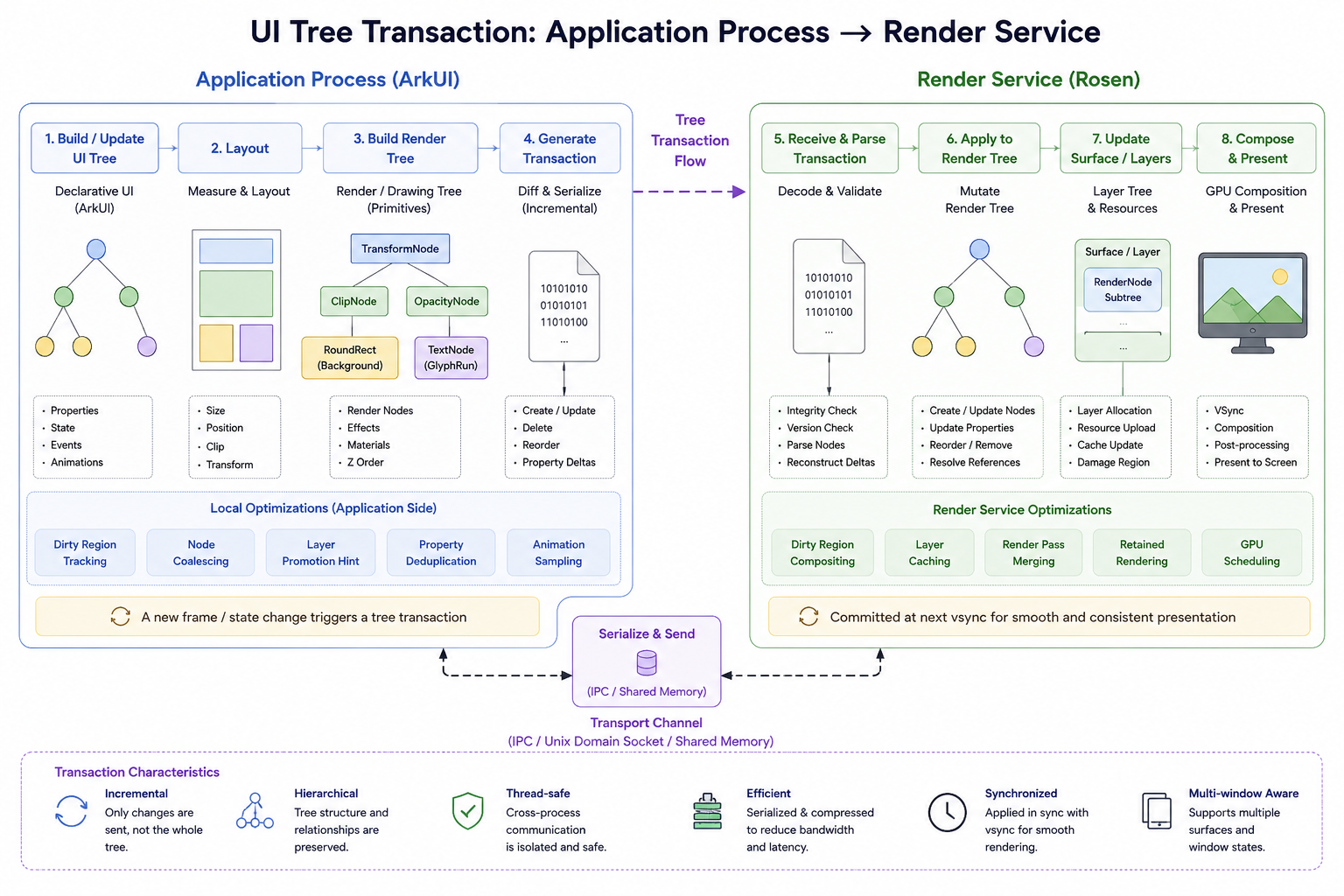
OpenHarmony’s Rosen library is the core rendering system that turns application UI state into pixels on screen. At a high level, it works like a client-server rendering architecture:
Application UI
  -> RSNode property changes
  -> RSTransactionData
  -> render_service
  -> RSRenderNode tree
  -> drawable tree
  -> GPU or hardware composer
  -> display
The key idea is separation of responsibility. On the application side, UI code manipulates lightweight RSNode objects and batches visual property changes into transactions. These transactions cross process boundaries through IPC and are consumed by Render Service. On the server side, those commands update an authoritative RSRenderNode tree. This server-owned tree is what the rendering pipeline prepares, optimizes, and draws.
The pipeline is staged:
- The app generates commands when UI properties change.
RSMainThreadreceives transaction data, applies node updates, advances animations, and computes visibility or occlusion.- During the prepare phase, the render tree is traversed and converted into drawable objects. Render parameters are synchronized into frame-stable snapshots.
- The render thread executes those drawables, either through GPU rendering or, when possible, by handing eligible surfaces directly to the hardware composer.
This architecture exists because modern UI rendering is not only about drawing shapes. It also has to coordinate animation timing, multi-window composition, dirty-region optimization, hardware overlays, refresh-rate control, buffer management, and cross-process synchronization.
Rosen contains the systems that make those responsibilities work together: render nodes and properties, drawable execution, VSync distribution, screen and display management, hardware composer integration, and runtime system-property switches for enabling features such as unified rendering, partial rendering, occlusion, and hardware composer paths.
What Happens After a UI Property Changes?
When you write something simple in ArkUI:
Text("Hello")
  .opacity(0.5)
Internally, the framework launches a sophisticated pipeline involving:
- UI tree mutation
- render tree transactions
- cross-process synchronization from application process to Render Service process
- VSync scheduling
- GPU composition
- hardware overlays
- final scanout
UI intent is converted into a retained rendering system managed by Rosen Render Service.
Before diving into code paths, here is the most useful mental model:
ArkUI
    = declarative intent layer
RenderNode tree
    = retained scene graph
Rosen Render Service
    = compositor + rendering engine
Hardware Composer
    = display plane scheduler
GPU
    = rasterization backend

UI property change
    -> ArkUI node update
    -> RenderNode mutation
    -> transaction commit
    -> IPC to Render Service
    -> scene graph update
    -> VSync-driven composition
    -> GPU / Hardware Composer
    -> display scanout
1.1 A Property Changes in ArkUI
Imagine:
Image($r("app.media.wallpaper"))
  .opacity(0.8)
Then later:
this.alpha = 0.5
Somewhere internally, this becomes a property mutation:
node->SetOpacity(0.5f);
At this point, nothing has been rendered yet. The system has only mutated state inside the UI tree.
Conceptually:
Before:
OpacityNode(opacity=0.8)

After:
OpacityNode(opacity=0.5)
This is extremely important: HarmonyOS prefers retained rendering over immediate rendering. The tree persists across frames, and only changed properties are updated.
1.2 UI Nodes Become Render Nodes
ArkUI components are semantic objects:
ButtonTextImageColumnList
The framework converts UI components into lower-level rendering primitives. Internally, these eventually become RSCanvasNode.
Conceptually:
Button
  -> Background
  -> Shadow
  -> Glyphs
  -> Effects

RSCanvasNode
  -> RectDrawable
  -> ShadowDrawable
  -> TextDrawable
  -> FilterDrawable
This transformation from semantic UI tree to render tree with a list of drawables, is one of the most important ideas in the pipeline.
1.3 Transactions Are Generated
This is where Rosen becomes interesting.
Instead of sending entire trees every frame, the framework sends incremental transactions to dramatically reduces IPC cost.
Typical mutation operations include:
- create node
- destroy node
- reorder children
- update property
- update transform
- update effect
Internally, you will see concepts around:
RSTransactionRSCommandRSModifier
Code paths worth exploring:
rosen/modules/render_service_client/core/transaction/
transaction_proxy.cpp
rs_transaction.cpp
Conceptually:
Node #42:
    opacity = 0.5
Node #77:
    transform = matrix(...)
Node #81:
    blurRadius = 32
These updates are serialized and sent to Render Service, a separate process. One defining characteristic of Rosen is that rendering is largely centralized in a separate process.
Application Process
    <-> IPC
Render Service Process
Unlike many lightweight UI frameworks, the app process does not fully own rendering. The app submits scene updates. Render Service owns composition. This architecture makes multi-window animations and incremental redraws much easier to control and more efficient.
2.1 Render Service Updates the Scene Graph
Inside Render Service, transactions mutate the authoritative render tree. This is where the retained scene graph truly lives.
Key nodes include:
RSDisplayNode- the root node of the whole treeRSRenderNode- elementary nodes that draw actual UI content.RSSurfaceRenderNode- the root nodes of each window that own actual render surfaces.
Relevant code paths:
rosen/modules/render_service/core/pipeline/
rs_render_node.cpp
rs_surface_render_node.cpp
Now the compositor has a fully updated scene graph representing all windows and surfaces in the system.
The Tree Optimizes Itself
The renderer aggressively optimizes the scene graph. The important thing to understand is:
The render tree is an optimization structure, not merely a hierarchy.
The system continuously evaluates:
- can nodes flatten?
- can surfaces merge?
- can layers cache?
- can redraws skip?
- can effects batch?
2.2 Drawables Are Generated
Eventually, nodes produce actual drawing commands. This is where the concept of a drawable becomes important.
Conceptually:
RSNode parses its properties
    -> Generate Corresponding Drawables
    -> Generate GPU draw commands
Examples include:
RectDrawableImageDrawableTextDrawableShadowDrawableFilterDrawable
2.3 Effects Become Render Passes
Effects are first-class citizens in Rosen:
- blur
- backdrop blur
- shadows
- brightness
- saturation
- shader effects
- transitions
Rosen models many effects directly in the render graph through FilterDrawable, which allows chaining multiple effects within a single draw pass. This is quite common in modern UI. For example,
FilterDrawable
  -> Blur
  -> Brightness
  -> Saturation
These chained effect would require:
- offscreen render targets
- intermediate textures
- multi-pass rendering
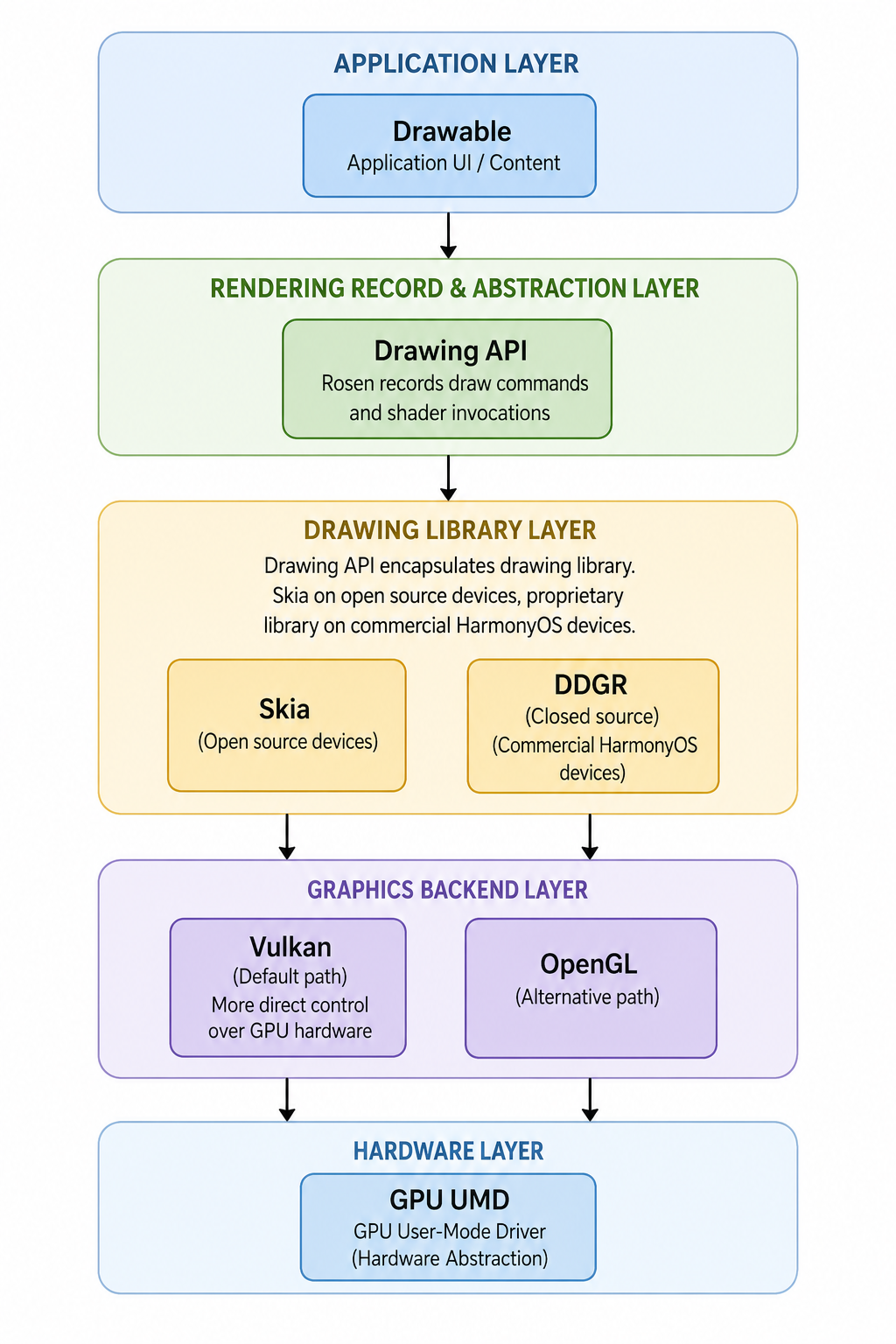
Rosen records the draw commands and shader invocations of all the drawables via Drawing API, which encapsulates drawing library of Skia on open source devices and a proprietary drawing library on commercial HarmonyOS devices. These libraries issue low-level commands to multiple backends, including OpenGL and Vulkan. Vulkan is the default path today, because it allows more direct control over the GPU hardware. The call path is illustrated below:
Why Partial Rendering Matters
Imagine an opacity animation of a small node on the screen.
Every animation frame, Rosen does:
update opacity property
updates dirty nodes
propagate dirty nodes to calculate dirty region
reuse cached regions
redraw dirty regions only
Skipping cached regions save a lot of CPU and GPU cycles and keep the system performant.
2.4 VSync Scheduling
Rendering is synchronized with display refresh. Render Service typically waits for VSync before committing composition.
while (running) {
    wait_for_vsync();
    apply_transactions();
    composite();
    present();
}
This is essential because it:
- prevents tearing
- batches updates
- synchronizes animations
- stabilizes frame pacing
Key concepts:
VSyncDistributorFrameSchedulerRenderFrame
Typical code paths:
render_service/
vsync/
frame_scheduler/
The timing model is:
property change
    -> transaction queue
    -> next VSync
    -> composition
    -> presentation
3.1 Surface Composition
At this point, Render Service owns multiple surfaces:
- app window
- video surface
- system UI
- blur layers
- floating windows
The compositor decides:
- GPU composition?
- hardware overlay?
- cached texture reuse?
- direct scanout?
3.2 Hardware Composer
Eventually, composition reaches the hardware composer layer.
The hardware composer may:
- directly scan out a video plane
- composite UI with GPU
- use overlay planes
- perform hardware scaling
This is extremely important for efficiency. For example:
Video surface
    -> hardware overlay

UI layer
    -> GPU composition
This avoids expensive GPU blending for fullscreen video.
3.3 Final Presentation
Eventually:
GPU command buffers submitted
    -> framebuffer ready
    -> display engine scanout
    -> photons emitted
And your original:
.opacity(0.5)
finally becomes visible.
Summary
The most important insight in the Rosen architecture is this:
Rosen separates UI semantics from rendering execution.
The stages are intentionally decoupled:
UI semantics
    -> layout
    -> scene graph
    -> drawables
    -> composition
    -> presentation
This separation enables features like:
- partial redraw
- advanced effects chaining
- multi-window composition
- distributed rendering
- GPU batching
- hardware overlays
- efficient animations at system scale
We will talk about these features in more details in future episodes.