Efficient Redraws and Dirty Region Management - HarmonyOS Pt.3
We now look into one of the most performance-critical aspects of any rendering system: deciding what actually needs to be redrawn each frame.
Modern UI frameworks face performance challenges constantly. A 120Hz display gives you roughly 8 milliseconds per frame. In that window, you need to process input, run animations, update layouts, generate draw commands, and submit everything to the GPU. If your screen has 2 million pixels and you redraw every single one of them every frame, you are burning CPU, GPU, and memory bandwidth on work that is often unnecessary.
HarmonyOS’s unified rendering architecture tackles this with two complementary strategies: reuse and de-redundancy. Together, they form the dirty region management system in Rosen Render Service.
This article unpacks how those strategies work, where they fit in the rendering pipeline, and how the system tracks dirty regions at both the application level and the global screen level.
The Mental Model
Only the region that actually changed—for example, a shopping app’s content area updating—needs new draw commands. Everything else can be reused from the previous frame’s buffer. This is the essence of partial rendering.
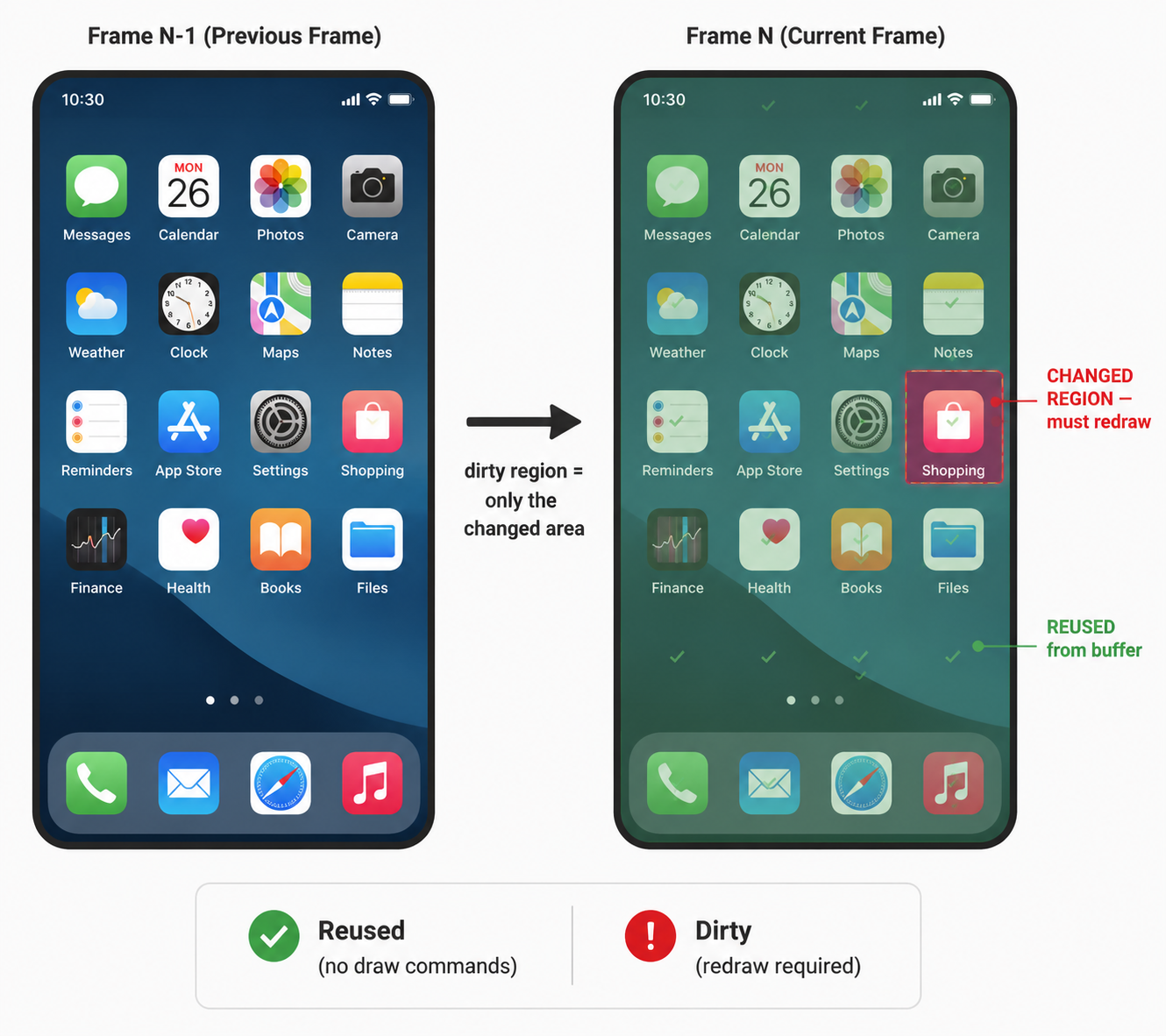
1. The Two Pillars
The dirty region system rests on two ideas that work in concert:
Pillar 1: Reuse
In the unified rendering architecture, each display manages a surface backed by a BufferQueue. Every frame, the render pipeline dequeues a buffer from this queue as its drawing target. Critically, that buffer still contains rendered pixels in its memory—but not necessarily from the immediately preceding frame.
In a multi-buffered rendering pipeline, the buffer you dequeue today might contain the rendering result from 2 or even 3 frames ago. This is the central complication that the dirty region system must account for.
The insight: if a region of the screen hasn’t changed across all the buffered frames, the corresponding pixels in the buffer are still correct. You don’t need to redraw them. But “haven’t changed” must span the buffer age—the number of frames the current buffer lags behind. We’ll explore this mechanism in detail in Section 5.
This is exposed through the GPU hardware via VK_KHR_incremental_present (VK_KHR_incremental_present), which tells the GPU which parts of the framebuffer actually need rendering. The GPU can then skip work for the rest—directly reducing power consumption and load.
Pillar 2: De-redundancy
Reuse handles the GPU side, but there is still a CPU-side problem: generating draw commands for widgets whose output will never be seen. De-redundancy eliminates two categories of unnecessary work:
Category A — Reused-region widgets. If a desktop icon’s pixels are being reused from the previous buffer, there is no point in generating draw commands for that icon in the current frame. It’s already on screen.
Category B — Occluded widgets. If a full-screen app window completely covers the home screen, every widget on the home screen is invisible. Generating draw commands for them is wasted effort—their output will be immediately overwritten by the app window’s pixels.
The benefits cascade across the entire pipeline:
De-redundancy
    → Fewer draw commands generated  (CPU saved)
    → Fewer commands flushed to GPU  (DDR bandwidth saved)
    → Fewer rasterization passes     (GPU saved)
Reuse
    → Fewer pixels shaded            (GPU saved)
    → Lower power consumption        (battery saved)
2. Where It Fits in the Pipeline
Dirty region optimization lives in two key phases of the render loop, both inside RSMainThread::Render():
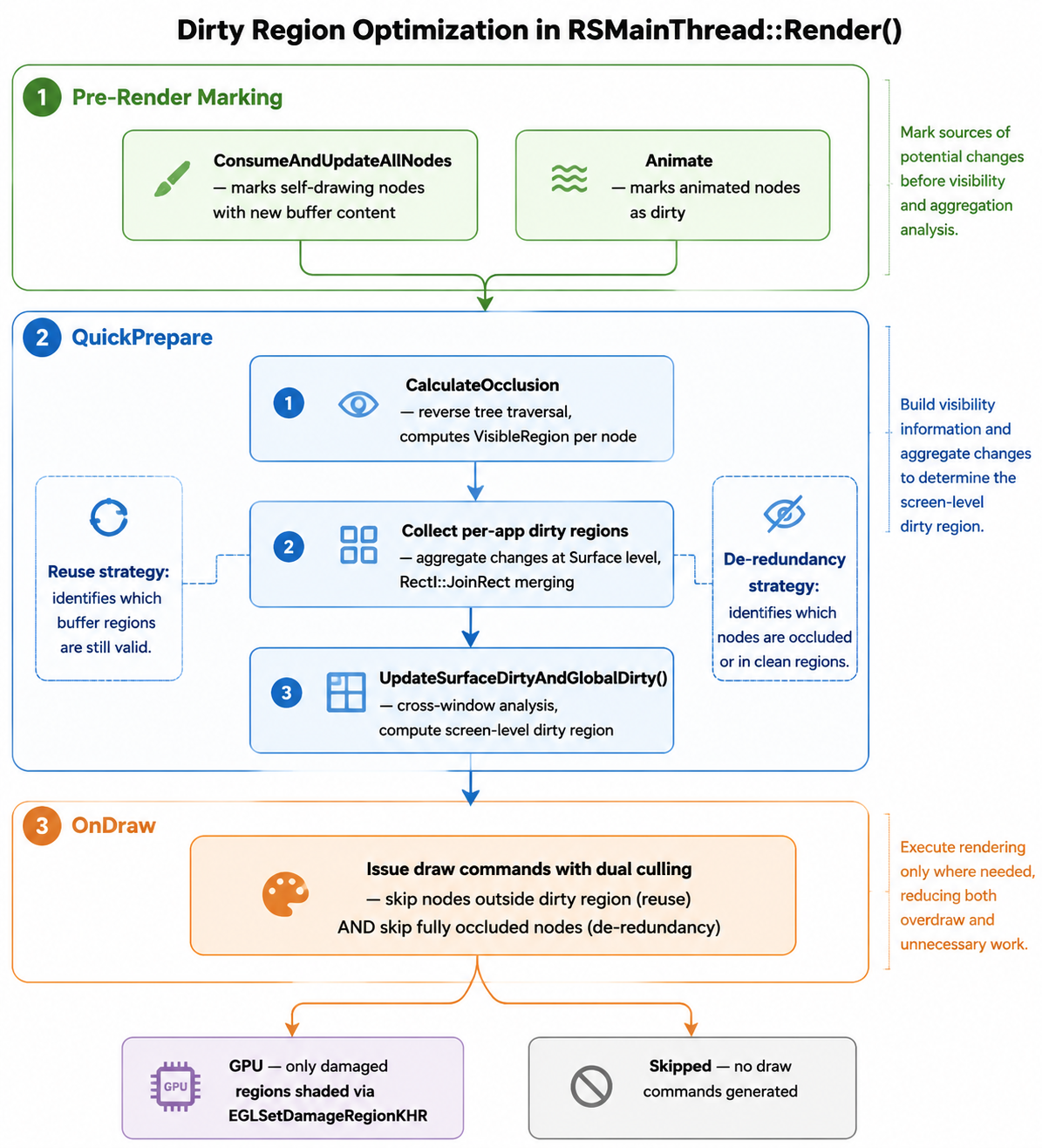
Render()
├── QuickPrepare()
│   ├── Calculate occlusion (reverse tree traversal)
│   ├── Collect per-app dirty regions
│   └── Compute screen dirty region (global dirty)
│
└── OnDraw()
    └── Issue draw commands, skipping:
        ├── nodes in reused (clean) regions
        └── nodes that are fully occluded
Before Render() even begins, earlier phases contribute vital metadata:
- ConsumeAndUpdateAllNodes: marks self-drawing nodes that received new buffer content.
- Animate: marks nodes with active animations as dirty.
This staged approach means that by the time OnDraw executes, every node carries enough information for a quick yes/no decision: does this node contribute to a region that actually needs drawing?
3. QuickPrepare: The Decision Phase
QuickPrepare is where the system builds the dirty region model that OnDraw will later consume. It happens in three passes.
3.1 Occlusion Calculation
The render tree is traversed in reverse order—bottom to top, back to front—to compute occlusion relationships. In a multi-window environment, this matters enormously: the home screen sits below a floating app, which sits below the status bar.
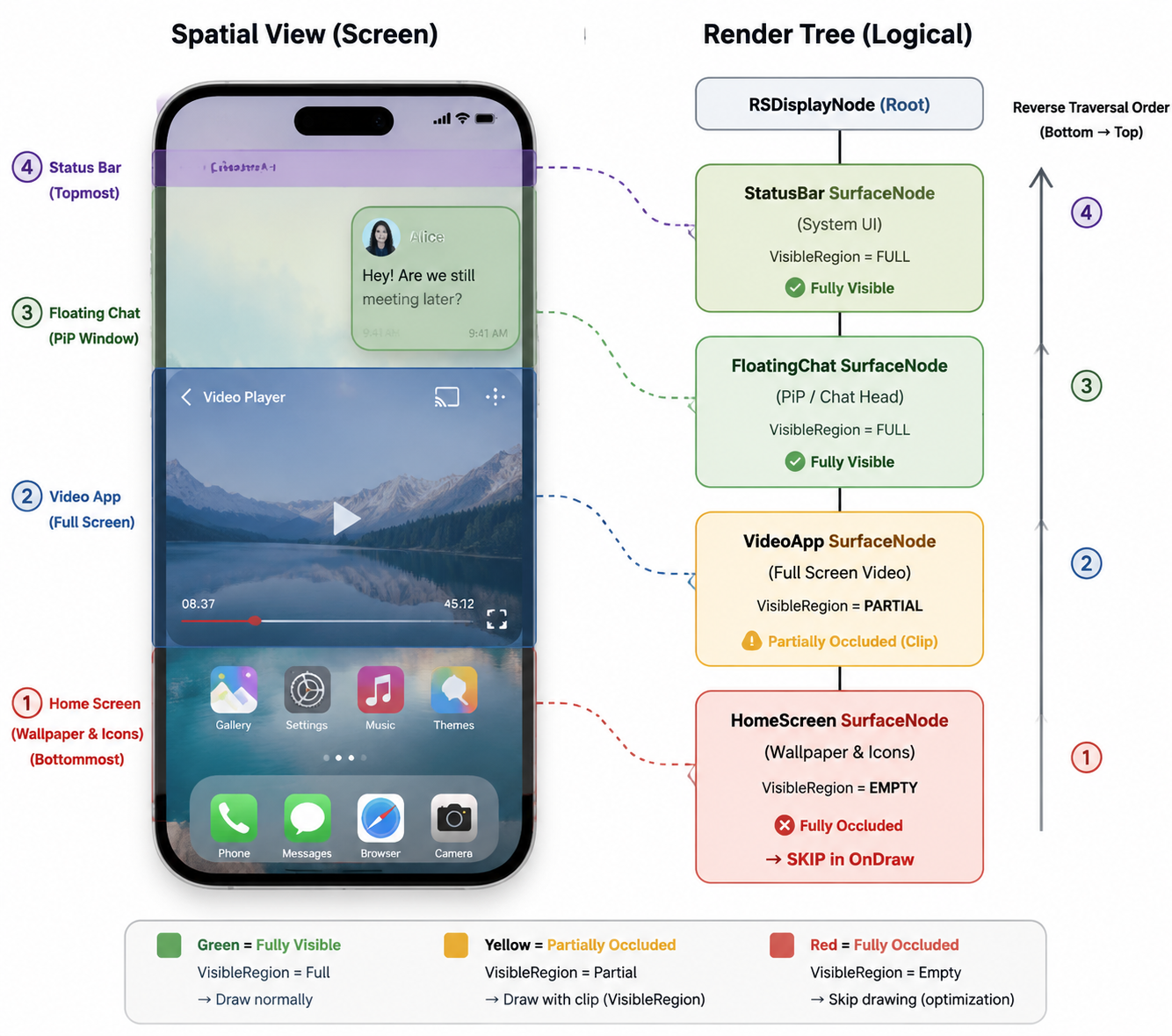
Reverse traversal order:
┌──────────────────────────────────────┐
│  1. Status Bar      (topmost)        │  ← traversed LAST
│  ┌────────────────────────────────┐  │
│  │ 2. Floating App                │  │
│  │  ┌──────────────────────────┐  │  │
│  │  │ 3. App Window            │  │  │
│  │  │  ┌────────────────────┐  │  │  │
│  │  │  │ 4. Home Screen     │  │  │  │  ← traversed FIRST
│  │  │  │  (occluded)        │  │  │  │
│  │  │  └────────────────────┘  │  │  │
│  │  └──────────────────────────┘  │  │
│  └────────────────────────────────┘  │
└──────────────────────────────────────┘
CalculateOcclusion determines, for each node, what portion of it is actually visible. A node whose VisibleRegion is empty is fully occluded and can be skipped entirely in the draw phase. Nodes partially occluded get their visible region clipped.
This is fundamentally a spatial data structure problem. The system solves this: given the accumulated opaque regions of all nodes drawn on top of this one, what remains visible?
3.2 Per-App Dirty Region Collection
While traversing the tree, the system simultaneously collects dirty regions—but not as one giant list. Each application gets its own dirty region, tracked independently.
The key architectural decision: dirty regions are tracked at the Surface level, not at the individual node level.
This granularity choice is important. A Surface represents a window or a self-drawing component. By aggregating dirty regions per-surface, the system can answer two questions simultaneously:
- What changed inside this application?
- Does this application’s change affect other windows?
This per-app design provides clearer debugging information, and allows us to perform aggressive optimizations, like skipping traversals of an entire surface when appropriate.
A single app might have multiple dirty sub-regions in one frame—a button highlight here, a text update there. These are merged into one bounding rectangle via RectI::JoinRect():
App Window dirty regions:
┌──────────────────┐
│                  │
│  ┌────┐          │   Button highlight:  (100,200) → (160,240)
│  │ B1 │          │
│  └────┘          │   Text update:       (400,300) → (550,320)
│        ┌───────┐ │
│        │ Text  │ │
│        └───────┘ │   Merged dirty rect: (100,200) → (550,320)  ← JoinRect result
│                  │
└──────────────────┘
This merging is a tradeoff: a larger bounding rectangle catches more nodes in the “dirty” net, potentially reducing the savings. But computing per-node dirty regions would cost more CPU than the draw commands it saves. The rectangle-based approximation hits a sweet spot.
3.3 Screen Dirty Region (Global Dirty)
At the end of QuickPrepare, after all nodes have been traversed, the system performs one final step: UpdateSurfaceDirtyAndGlobalDirty(). This is where per-app dirty regions are elevated to a screen-level understanding.
Per-app dirty regions answer “what changed in my window?” Screen dirty region answers “what pixels on the physical display actually need new content?”
The two are not the same, because windows interact with each other. A translucent window over a dirty app means the window’s region is also dirty. A window that moved or resized creates dirty regions in both its old and new positions. A shadow extending beyond an app window dirties pixels in neighboring windows.
The system accounts for these cross-window effects by adding to the global dirty region when:
Screen dirty region ← union of:
├── Per-app dirty regions (direct changes)
├── Regions intersecting transparent windows
│   (translucency → background bleeds through → must redraw)
├── Regions affected by z-order changes
│   (window moved to front → what was visible is now different)
├── Regions affected by window position changes
│   (window moved → old area and new area both dirty)
├── Regions affected by window add/remove
├── Shadow regions that extend beyond window bounds
├── Regions intersecting blur effects
│   (blur samples surrounding pixels → surroundings must be up-to-date)
└── Special full-screen refresh triggers
    (power state changes, color filter changes, screen curtain,
     first frame entering partial update mode, watermark changes)
There is also a notable anti-abuse mechanism: ResetDisplayDirtyRegion() exists for cases where the entire screen must be refreshed (power state changes, color filter changes, screen curtain mode, watermark transitions, and first-frame entry into partial update mode). The source comments carry a warning:
Add log entries when adding new full-refresh scenarios. Do not abuse this interface!
A full-screen refresh defeats the entire purpose of the dirty region system. Every new trigger for it should be carefully justified.
4. How Dirty Regions Change Frame-to-Frame
A dirty region is fundamentally a frame-to-frame concept: what pixels are different in frame N compared to frame N-1?
If an application’s page is completely static—no animations, no user interaction, no data updates—its dirty region for the current frame is empty. The entire window can be reused from the buffer. This is the ideal case that the system optimizes for.
In practice, applications are rarely completely static, but they are usually mostly static. A typical messaging app might have:
Frame N-1 → Frame N:
├── Chat list:         unchanged (reuse)
├── Top bar:           unchanged (reuse)
├── Input field:       changed  (redraw — cursor blink)
├── Keyboard:          unchanged (reuse)
└── Status bar:        unchanged (reuse)
The dirty region for this frame is tiny relative to the screen—just the area around the blinking cursor. And that tiny region is all that gets drawn.
When multiple regions change within a single app in the same frame, they are merged:
// Simplified — the actual merge happens via RectI::JoinRect()
dirty_region = region_button.JoinRect(region_text).JoinRect(region_image);
This produces one bounding rectangle that covers all changed areas. It may include some unchanged pixels in between, but the overhead of those extra pixels is typically smaller than the cost of managing multiple disjoint dirty rectangles.
5. Buffer Age and Historical Dirty Merging
There is a subtle but critical problem with the frame-to-frame model we just described. It assumes the buffer we draw into today contains the pixels we drew yesterday. In a multi-buffered rendering pipeline, that assumption breaks.
5.1 The Multi-Buffer Problem
Modern graphics pipelines use double or triple buffering to decouple GPU rendering from display scanout. The GPU renders into a back buffer while the display controller reads from a front buffer. When rendering completes, the buffers swap. This means the buffer the system dequeues for the current frame may contain pixels rendered 2 or even 3 frames ago—not the immediately preceding frame.
Triple-buffered pipeline:
┌──────────────────────────────────────────────────────────┐
│  Buffer A (Front)  │  Buffer B (Back 1)  │  Buffer C (Back 2) │
│  → On screen now   │  → Rendered N-1 ago │  → Rendered N-2 ago │
│                    │  → Just swapped in   │  → About to be used  │
└──────────────────────────────────────────────────────────┘
Now imagine you only track the dirty region for the current frame. If Buffer C (rendered 2 frames ago) is the next draw target, and you only redraw the regions that changed in this frame, you’ve missed the regions that changed in the previous frame. Those previous-frame changes aren’t in Buffer C’s memory—they happened after Buffer C was last used. The result: stale content appears on screen.
The dirty region for a frame must cover all changes since the buffer was last rendered into—not just changes since the last frame.
5.2 The RSDirtyRegionManager and Its Circular History
Rosen solves this with RSDirtyRegionManager, which maintains a circular history buffer of recent dirty regions:
// From rs_dirty_region_manager.h
int historyHead_ = -1;
unsigned int historySize_ = 0;
const unsigned HISTORY_QUEUE_MAX_SIZE = 10;   // up to 10 frames of history
dirtyHistory_ (circular buffer, max 10 entries):
┌────┬────┬────┬────┬────┬────┬────┬────┬────┬────┐
│ F0 │ F1 │ F2 │ F3 │ F4 │ F5 │ F6 │ F7 │ F8 │ F9 │
└────┴────┴────┴────┴────┴────┴────┴────┴────┴────┘
                                              ↑
                                         historyHead_
                                    (most recent frame)
Every frame, after the current dirty region is computed, UpdateDirty() does two things:
PushHistory(rect)— appends the current frame’s dirty region to the circular buffer, advancinghistoryHead_and incrementinghistorySize_(up toHISTORY_QUEUE_MAX_SIZE).MergeHistory(age, rect)— merges the current frame’s dirty region with the lastagehistorical frames’ dirty regions.
void RSDirtyRegionManager::PushHistory(RectI rect)
{
    int next = (historyHead_ + 1) % HISTORY_QUEUE_MAX_SIZE;
    dirtyHistory_[next] = rect;
    if (historySize_ < HISTORY_QUEUE_MAX_SIZE) {
        ++historySize_;
    }
    historyHead_ = next;
}
5.3 How MergeHistory Works
The MergeHistory function takes the bufferAge_ and the current frame’s dirty region, then iterates backward through history to produce a merged region that covers all changes since the buffer was last used:
RectI RSDirtyRegionManager::MergeHistory(unsigned int age, RectI rect) const
{
    if (age == 0 || age > historySize_) {
        rect = rect.JoinRect(surfaceRect_);   // full refresh fallback
        age = historySize_;
    }
    // Iterate from oldest to newest within the age window
    for (unsigned int i = historySize_; i > historySize_ - age; --i) {
        auto subRect = GetHistory((i - 1));
        if (subRect.IsEmpty()) {
            continue;
        }
        if (rect.IsEmpty()) {
            rect = subRect;
            continue;
        }
        rect = rect.JoinRect(subRect);
    }
    return rect;
}
The algorithm is straightforward: starting from the current frame’s dirty region, it iterates backward through age historical entries, unioning each non-empty dirty rectangle via JoinRect. The result is a single bounding rectangle that covers everything that changed across the entire buffer age window.
5.4 Buffer Age Interpretation
The bufferAge_ parameter comes from the GPU’s buffer management system—it tells the renderer how many swaps have occurred since this buffer was last used as a render target:
| bufferAge | Meaning | Merge Behavior |
|---|---|---|
0 |
No history available | Merge with full surfaceRect_ (safe fallback — redraw everything) |
1 |
Double buffering, buffer is 1 frame old | Merge current + last frame |
2 |
Triple buffering, buffer is 2 frames old | Merge current + last 2 frames |
> 2 |
Deeper pipeline | Merge current + last N frames |
-1 |
Unknown / error | Full refresh — merge all available history |
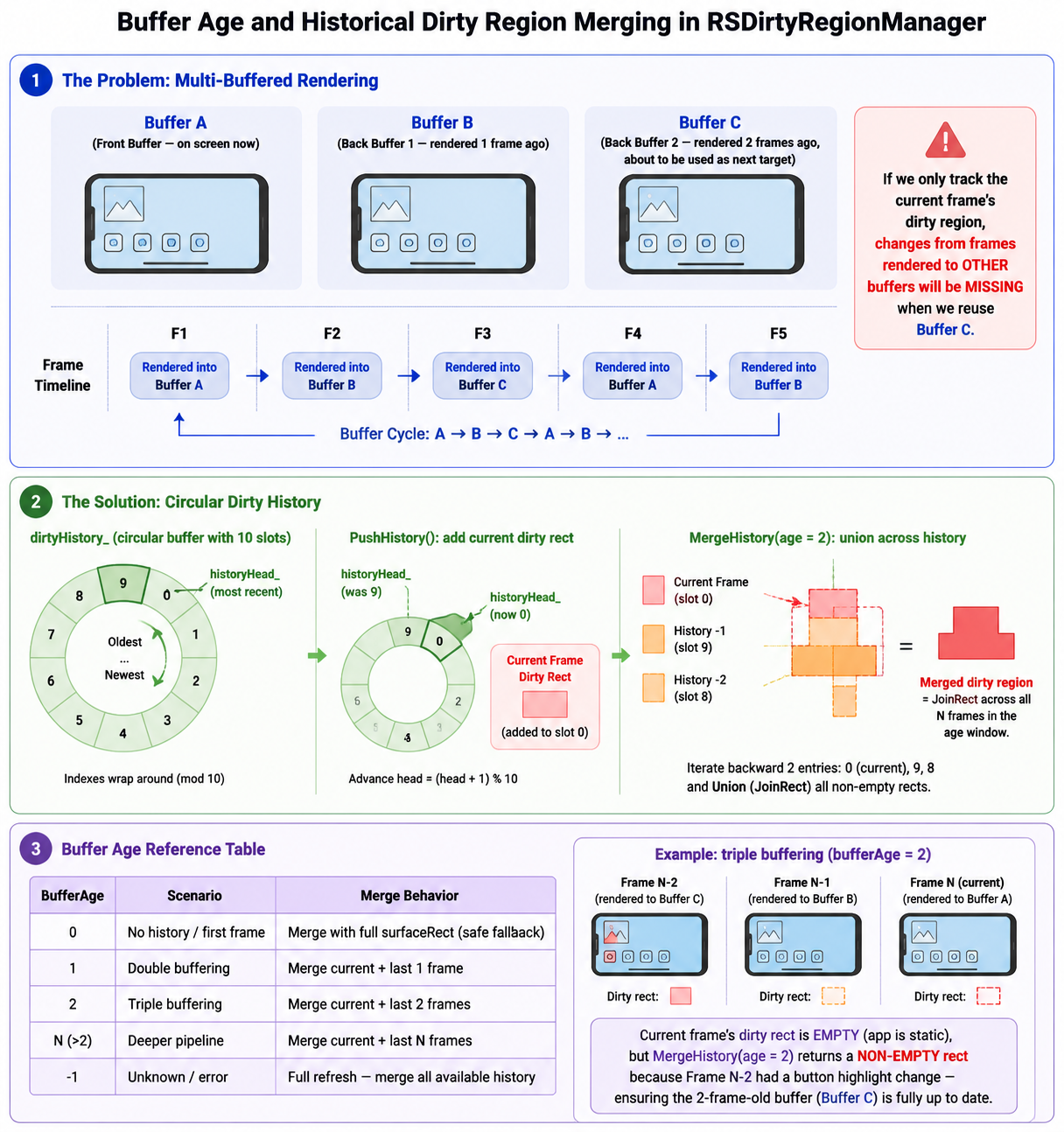
In the common triple-buffering case (bufferAge = 2), even if the app is static in the current frame (empty dirty rect), the merged dirty region would still include any changes from frames N-1 and N-2—ensuring the buffer is fully up to date.
5.5 Advanced Dirty Regions
For more complex scenarios, Rosen also maintains an advancedDirtyHistory_ that tracks multiple disjoint dirty rectangles per frame instead of a single bounding box. This is controlled by AdvancedDirtyRegionType:
DISABLED: advanced dirty regions produce a single bounding rectangle (same as the standard path).- Enabled: advanced dirty regions preserve multiple disjoint rectangles, allowing even finer-grained partial updates at the cost of more complex region management.
void RSDirtyRegionManager::MergeAdvancedDirtyHistory(unsigned int age)
{
    // Same buffer-age logic, but operates on vectors of rects
    // using Occlusion::Region for proper disjoint-region union
    // rather than a single bounding JoinRect.
}
The advanced path uses Occlusion::Region operations instead of RectI::JoinRect, enabling true disjoint region tracking. This is useful when an application has changes scattered across the screen—maintaining separate rectangles avoids the over-draw penalty of a large bounding box that spans the gap between them.
6. OnDraw: Where the Savings Happen
All of QuickPrepare’s work leads to this moment. OnDraw walks the render tree and issues actual draw commands to the GPU—but it only issues commands for nodes that pass two checks:
For each node:
├── Is the node inside or intersecting the dirty region?
│   ├── No → SKIP (reuse buffer content)
│   └── Yes → continue to check 2
│
└── Is the node visible (not fully occluded)?
    ├── No → SKIP (occluded, would be overwritten anyway)
    └── Yes → GENERATE draw commands
Each SurfaceNode and CanvasNode is evaluated against the dirty region and occlusion data computed during QuickPrepare. Nodes outside the dirty region have their draw commands suppressed—their content is already correct in the buffer from the previous frame. Nodes that are fully occluded have their draw commands suppressed—their output would never reach the screen.
The logic cascades to children: if a parent node is entirely outside the dirty region or fully occluded, none of its descendants need to be evaluated. This makes the culling efficient even for deeply nested UI trees.
Putting It All Together
Let’s trace through a concrete example. Imagine a user switches from the home screen to a full-screen video app, on a device with triple buffering (bufferAge = 2):
Frame 1: Home screen visible
├── bufferAge: 2 (buffer was last rendered 2 frames ago)
├── MergeHistory(age=2): merges current + F-1 + F-2 dirty regions
├── QuickPrepare: nothing dirty (static home screen across all 3 frames)
├── OnDraw: very little work — mostly reuse
└── Global dirty: empty

Frame 2: App launch animation begins
├── bufferAge: 2
├── Animate marks animating nodes as dirty
├── QuickPrepare:
│   ├── Occlusion: app window partially covers home screen
│   ├── Per-app dirty: app window has dirty region (loading content)
│   └── Global dirty: app window + animation overlap region
├── MergeHistory(age=2):
│   ├── Current frame dirty: app launch area
│   ├── Frame N-1 dirty: (empty, was static home screen)
│   ├── Frame N-2 dirty: (empty, was static home screen)
│   └── Merged result: app launch area (unchanged — no stale frames to catch up)
├── OnDraw:
│   ├── App window area → REDRAW
│   ├── Home screen occluded region → SKIP
│   └── Home screen visible region → REUSE
└── → Partial frame, GPU only shades the changed area

Frame 3: App fully visible, home screen fully occluded
├── bufferAge: 2
├── QuickPrepare:
│   ├── Occlusion: home screen → fully occluded (VisibleRegion is empty)
│   ├── Per-app dirty: app window dirty (content loaded)
│   └── Global dirty: app window area
├── MergeHistory(age=2):
│   ├── Current frame dirty: newly loaded app content
│   ├── Frame N-1 dirty: app launch area (from Frame 2)
│   ├── Frame N-2 dirty: (empty)
│   └── Merged result: union of app content + launch area
│       → Ensures the 2-frame-old buffer gets ALL changes
│       → even those that happened while it wasn't the active target
├── OnDraw:
│   ├── App window (merged region) → REDRAW
│   └── Home screen → SKIP (fully occluded, no draw commands generated)
└── → Savings: home screen's entire widget tree is skipped,
│     AND the merged region is still much smaller than full screen
The system adapts on two axes. The same home screen that was mostly reused in Frame 1 has its entire draw command generation skipped in Frame 3, not because it changed, but because it became invisible. Meanwhile, MergeHistory ensures that even with a 2-frame-old buffer, every pixel that changed since the buffer was last touched is accounted for—without resorting to a full-screen redraw.
Summary
The dirty region management system in Rosen Render Service achieves its efficiency through two complementary strategies, held together by a third mechanism that ensures correctness across multi-buffered frames:
Reuse (GPU-side)
    Frame buffer pixels that haven't changed are kept.
    VK_KHR_incremental_present tells the GPU what to shade.
    → Lower GPU load, lower power consumption.

De-redundancy (CPU-side)
    Draw commands for occluded or reused widgets are never generated.
    Both CPU instruction generation and GPU command submission are reduced.
    → Lower CPU usage, lower DDR bandwidth.

Historical Dirty Merging (the glue)
    RSDirtyRegionManager maintains a circular dirtyHistory_ (max 10 entries).
    MergeHistory(bufferAge) unions current + N previous frames' dirty regions.
    → Correctness guarantee: no stale pixels, even with triple buffering.
Together, they form an optimized system where:
Each frame does work proportional to what actually changed, not to what is on screen.
This is the kind of optimization that users don’t consciously notice but feel every day. When a device with modest hardware scrolls smoothly, switches apps without jank, and delivers all-day battery life while animating at 120Hz—the dirty region system is one of the reasons why.
In the next part, we will explore the animation pipeline and how Rosen schedules and interpolates animated properties within the VSync rhythm we discussed in Part 1.
Appendix I, Design choices
Here’s a quick recap of critical design choices in the dirty region management system:
-
Why per-surface dirty regions instead of a single global one? Because surfaces map to applications. When one app animates, only its surface’s dirty region needs updating. A single global dirty list would couple all applications together. It also provides better debugging information, showing exactly where the dirty region comes from through dumps and traces.
-
Why bounding rectangles instead of exact pixel regions? Because the CPU cost of computing pixel-accurate dirty regions across a deeply nested render tree would exceed the GPU savings. A rectangle join is a cheap operation; the slight over-draw is almost always worth it.
-
Why reverse traversal for occlusion? Because occlusion is easiest to compute top-down: you accumulate opaque regions from windows on top and subtract them from what’s visible underneath. Reverse traversal naturally builds this accumulation.
-
Why separate QuickPrepare from OnDraw? Cleaner separation of responsibilities since these two operations are naturally sequential. Plus, on the latest builds, these two stages are actually performed on two separate threads, QuickPrepare on the main thread and OnDraw on an exclusive render thread. This enables pipeline parallelism and better utilize the multi-core processor during heavy loads.
-
Why a circular dirty history and buffer age? Because multi-buffered rendering means the buffer you draw into today might be 2 or 3 frames old. Without merging dirty regions across the buffer age window, changes from intermediate frames would be lost, producing visible artifacts. The
MergeHistoryapproach is a clean, bounded solution: it scales to any buffer depth, has a fixed memory cost (max 10 history entries), and degrades gracefully to full refresh whenbufferAgeexceeds the known history.